
Feihua is a lightweight anti-virus and anti-malware program designed for Windows systems. It verifies file hashes against the VirusShare.com database, helping users detect known malware and viruses based on their unique identifiers.
Feihua "廢話" (pinyin: /fèi-huà/) translates closely to "nonsense."
Features
- Hash Verification — Feihua compares file hashes against a local database sourced from VirusShare.com.
- Lightweight — Designed to be resource-efficient and run smoothly on Windows systems.
- Simple Interface User-friendly interface for easy hash checking and malware detection.
Installation
- Installation:
- Download the latest release from the releases page.
- Extract the downloaded zip file to a preferred location on your Windows machine.
- Running Feihua:
- Click the Update Database button on first use or if you have no hashes.sqlite3 on the extraction folder. This may take a while to finish depending on your network connection strength. Alternatively, you can download a pre-fetched hashes.sqlite3 database from the releases.
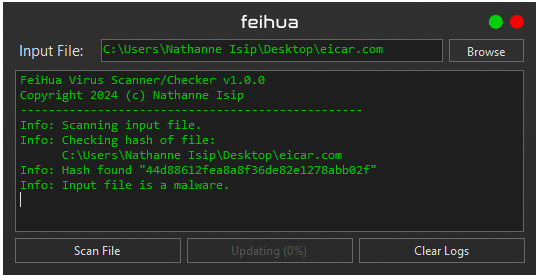
- Use the interface to select a file and check its hash against the VirusShare.com database with the Scan File(s) button.
- Verifying Files:
- Select a file using the browse button.
- Feihua will calculate the hash of the selected file and compare it against the local database.
- If a match is found, Feihua will alert you about the file's status based on VirusShare.com data.